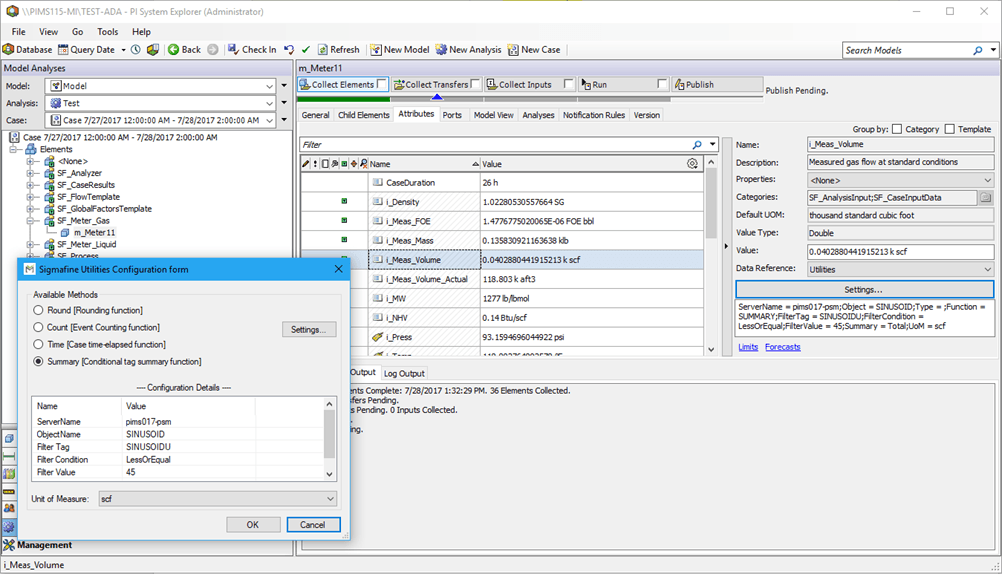
Configuring - Summary Function
Please note that this configuration can be done only at an individual Element level.
In the System Explorer window, select Model Analysis from the navigation pane.
In the Elements tree, locate and select the Element you want (e.g., m_Meter11).
Click on the Attributes tab.
In the Name column, select the Attribute to be rounded (e.g., i_Mass_Volume).
Click on the Data Reference down-arrow and select Utilities as the setting of the attribute (e.g., i_Mass_Volume).
Click on the Settings button to open the Sigmafine Utilities Configuration form window.
Under Available Methods, select Summary (Conditional tag summary function).
Click the Settings button to access the detailed SUMMARY function Settings window.
![Figure 517: Sigmafine Utilities - Settings [SUMMARY]](/DocumentDepot/DocSFHub/docs_2026/assets/images/util-summary-func-config_sig-utilities-settings-summary-WND-2d1ca8ce4582ec5ae2779493c8a89a32.png)
Enter the Attributes for the SUMMARY functions according to the following tables.
Sigmafine Utility – SUMMARY function parameters
Calculation Type Description PI Server Name of the PI Server for tag selection. PI Tag Name of the PI Tag targeting the summary. Summary Type of the summary to be performed. See the table of the summaries below. Filter Summary Specific Settings - PI Tag Tag for evaluating the condition. It is assumed this tag belongs to the same PI Server of the tag to be totalized. Filter Summary Specific Settings - Condition Condition to be evaluated for the tag. Here’s the list of all the possible condition:Equal (Valid for all types: String, Digital, Int, Double…etc)NotEqual (Valid for all types: String, Digital, Int, Double…etc)Greater (Valid only for numeric types: Int, Double…etc)GreaterOrEqual (Valid only for numeric types: Int, Double…etc)Less (Valid only for numeric types: Int, Double…etc)LessOrEqual (Valid only for numeric types: Int, Double…etc)Like (Valid only for string type) • NotLike (Valid only for string type) Filter Summary Specific Settings - Value Condition value to be evaluated in the Condition. Sigmafine Utility – SUMMARY types
Summary Value Description Total 1 A totalization over the time range. Average 2 The average value over the time range. Minimum 4 The minimum value over the time range. Maximum 8 The maximum value over the time range. Range 16 The range of values over the time range (Maximum-Minimum) StdDev 32 The standard deviation over the time range. PopulationStdDev 64 The population standard deviation over the time range. Count 128 The sum of event count over the time range when calculation basis is event weighted. The sum of event time duration over the time range when calculation basis is time weighted. PercentGood 8192 Percent of data with good value during the calculation period. For time weighted calculations, the percentage is based on time. For event weighted calculations, the percent is based on event count. When finished with the settings, OK to save your selections and close the Sigmafine Utilities - Settings [SUMMARY] window.
You are returned to the Sigmafine Utilities Configuration form window.
Click OK to save the configuration and close the Sigmafine Utilities Configuration form window.
The following image provides a sample for totalization of the tag SINUSOID based on the value of SINUSOIDU when it is less or equal to 45.